

Feature Branches
Run parallel project-agent workstreams inside one app
A feature branch is a separate code workstream inside one project. Each tracked branch has its own project-agent chat and sandbox preview, so you can develop and test in parallel without mixing conversations.
Feature branches are currently enabled for selected organizations. If the branch New action is missing from the project branch list, your organization does not currently have access.
When to use branches
Use a feature branch when you want a parallel workstream inside the same app:
- Building a feature while other work continues on the default branch
- Trying a risky experiment without blocking the main agent
- Isolating a bug fix while another agent keeps shipping elsewhere
This is still one project — not a separate app, Surface, Module, or conversation fork.
What branches isolate (and what they don't)
Branches isolate:
- Code — each branch has its own GitHub branch and commits
- Chat / agent work — each tracked branch has its own project-agent conversation
- Sandbox runtime — each branch has its own builder sandbox and preview
Creating a branch can fork each standalone Data Store the project uses, so the branch works on its own copy of the data. Feature branches and their previews also get their own routing target. See Connecting & routing.
Two branches routed to the same data store branch share its data. Schema and data changes made on one are visible to the other, so coordinate that work and avoid competing schema changes at the same time.
Working with branches
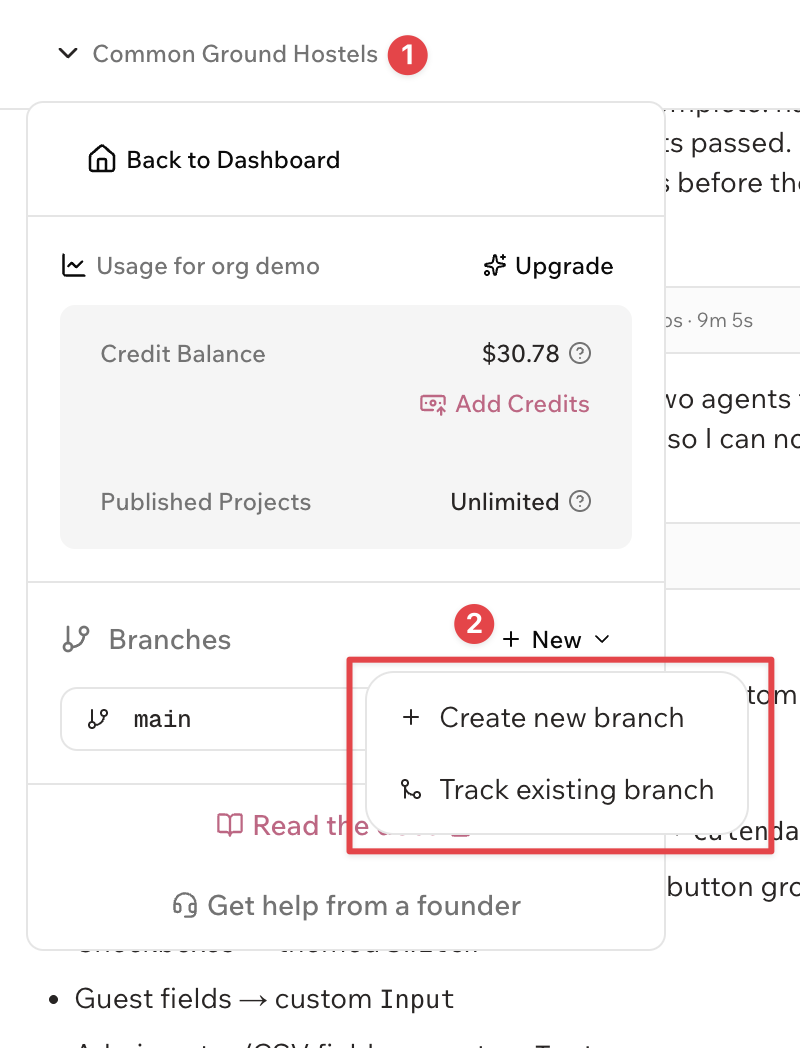
- Open the project Branches list or branch selector.
- Create or track a branch:
- New → Create new branch creates a GitHub branch from the currently open branch and starts tracking it in the project.
- New → Track existing branch makes an existing GitHub branch available in the project builder.
- Switch branches from the list. Each tracked branch opens with its own project-agent chat and sandbox.
- Work with the agent and test in the builder sandbox preview on that branch.
Agent-driven merge
The primary merge flow is agent-driven. From a non-default branch:
- Click Merge.
- Review the plain-language merge preview and any conflict warning, then confirm.
- The request opens in the default branch’s chat. That branch’s agent performs the merge, resolves file conflicts, and verifies the result.
If the default-branch agent is busy, the merge is not queued — wait until its current run finishes, then try again. If the default branch chat has never been opened, open it once first, then retry the merge.
After a successful merge, Stop Tracking the feature branch is optional cleanup.
Preview deployments and publishing
Feature branches can create shareable preview deployments for review outside the project builder.
- The default branch preview uses
https://app-slug-preview.stardeck.site. - A feature branch preview uses
https://app-slug-preview-branch-name.stardeck.site. Stardeck normalizes the branch name so the hostname stays DNS-safe. - A project can have up to 5 active feature-branch previews. The default branch preview does not count toward this limit.
Production publishing remains default-branch only. To ship feature-branch work to production, merge it into the default branch, verify the result, then publish. See Publishing & Deployment.
Default-branch-only operations
Some project operations stay on the default branch:
- Updates
- Module declaration sync. Modules sync from the default branch only. You turn Modules on or off in Settings → Modules.
Work on those from the default branch after merging related changes.
Branch management
Open branch settings (gear icon) for a tracked branch to:
- View on GitHub — open the branch on GitHub
- Stop Tracking — remove it from Stardeck; any active preview deployment and its hostname are cleaned up, while the GitHub branch stays intact
The default branch cannot be untracked.
Feature branches vs conversation forks
| Feature branch | Conversation fork | |
|---|---|---|
| Changes code? | Yes — full project agent | No — read-only planning/exploration |
| Isolation | Separate code, chat, and sandbox | Separate chat only |
| Goal | Parallel build workstreams | Explore ideas without touching code |
Need a scratch pad for plans without changing code? Use conversation forking. Need a parallel agent that can edit and test? Use a feature branch.